Serverless AI Agent: Amazon Bedrock ve Streamlit ile E-Ticaret Asistanı
Published:

“Agent aşağı, agent yukarı… al sana bir agent, al sana bir agent daha…“.
Artık sadece prompt yazıp cevap aldığımız chatbot’lar yetmiyor. Veritabanımıza bağlanan, kurallarımızı anlayan ve bizim adımıza aksiyon alabilen sistemler kurmak istiyoruz. Ben de bu konuyu biraz kurcalamak ve Bedrock AgentCore ile uçtan uca çalışan bir asistanı nasıl ayağa kaldırırım? sorusuna pratik bir cevap bulmak istedim. Senaryo düşünürken de aklıma (hiç kimsenin aklına gelmemiş olan) e-ticaret süreçleri geldi. Kullanıcıların sipariş durumlarını sorgulayabildiği, arka planda stok ve iade kurallarını kontrol edip gerekirse siparişi iptal edebilen bir asistan, hem Tool Calling (araç çağırma) mantığını kavramak hem de serverless (<3) mimariyi test etmek için gerçekten ideal.
Bu yazıda, Amazon Bedrock (Nova Pro modeli), AWS Lambda, Amazon DynamoDB ve Streamlit kullanarak sıfırdan bir E-Ticaret Destek Asistanı geliştireceğiz. Amacımız sadece LLM’e prompt vermek değil. LLM’in veritabanımızla konuşmasını, iş kurallarını (business logic) uygulamasını ve sonuçları kullanıcıya derli toplu sunmasını sağlamak.
Mimari
Projeyi tasarlarken altyapıyı tamamen serverless olarak kurguladık ve geliştirme ortamı olarak AWS Cloud9 kullandık (lokalde credential vb. ile uğraşmamak için birebir).
Mimari şu şekilde:
┌──────────────┐      ┌──────────────────────┐      ┌──────────────────┐
│              │      │                      │      │                  │
│  Streamlit   │───►  │ Amazon Bedrock Agent │───►  │   AWS Lambda     │
│  (Frontend)  │◄───  │ (Nova Pro Model)     │◄───  │ (Action Group)   │
│              │      │                      │      │                  │
└──────────────┘      └──────────────────────┘      └─────────┬────────┘
                                                              │
                                                              ▼
                                                    ┌──────────────────┐
                                                    │ Amazon DynamoDB  │
                                                    │ (Orders & Prods) │
                                                    └──────────────────┘
Projeyi şekillendirirken bazı temel kısıtlar ve kurallar uyguladık. Öncelikle iş kurallarını tamamen Lambda katmanında tutuyoruz. LLM’in kendi inisiyatifiyle iade onaylamasını istemediğimiz için iade süresinin geçip geçmediği veya ürünün kargoda olup olmadığı gibi kritik kontrolleri Lambda içerisinde Python ile gerçekleştirip, modele sadece “İade reddedildi, sebebi şu” şeklinde gibi bir sonuç dönüyoruz. Öte yandan Amazon Nova gibi modeller İngilizce ile çok daha kararlı çalıştığı için veritabanı kayıtlarını, Lambda log’larını ve OpenAPI şemasını tamamen İngilizce olarak kurguladık. Son olarak kullanıcı deneyimini en hızlı ve sade şekilde test edebilmek için de arayüz tarafında Streamlit kullandık.
1. Veritabanı Katmanı (DynamoDB)
İlk aşamada asistanımızın kontrol edeceği verileri tutacağımız DynamoDB tablolarını data_creator.py ile oluşturuyoruz. Tek bir tablo yerine EcommerceOrders ve EcommerceProducts olmak üzere iki tablo tasarladık. Böylece asistan, sipariş detayını çekerken ürün tablosuna da gidip fiyat ve açıklama gibi bilgileri birleştirmek (multi-step reasoning) zorunda kalacak. 👇🏻
data_creator
# data_creator.py

import boto3
import time
from botocore.exceptions import ClientError

region = 'us-east-1'
dynamodb = boto3.resource('dynamodb', region_name=region)

products_table_name = 'EcommerceProducts'
orders_table_name = 'EcommerceOrders'

def create_table(table_name, key_name):
    try:
        table = dynamodb.create_table(
            TableName=table_name,
            KeySchema=[{'AttributeName': key_name, 'KeyType': 'HASH'}],
            AttributeDefinitions=[{'AttributeName': key_name, 'AttributeType': 'S'}],
            BillingMode='PAY_PER_REQUEST'
        )
        print(f"Creating table '{table_name}', please wait...")
        table.wait_until_exists()
        print(f"Table '{table_name}' created successfully.")
        return table
    except ClientError as e:
        if e.response['Error']['Code'] == 'ResourceInUseException':
            print(f"Table '{table_name}' already exists. Proceeding to update data.")
            return dynamodb.Table(table_name)
        else:
            print(f"Error creating table: {e}")
            raise e

mock_products = [
    {"ProductId": "PROD-201", "ProductName": "Wireless Headphones", "Price": 125, "Stock": 42, "Category": "Electronics", "Description": "Bluetooth headphones with active noise cancelling (ANC)."},
    {"ProductId": "PROD-202", "ProductName": "Smartwatch", "Price": 320, "Stock": 15, "Category": "Electronics", "Description": "Waterproof smartwatch with heart rate monitor and step tracker."},
    {"ProductId": "PROD-203", "ProductName": "Backpack", "Price": 85, "Stock": 120, "Category": "Accessories", "Description": "Water-resistant backpack with 15.6 inch laptop compartment."},
    {"ProductId": "PROD-204", "ProductName": "Coffee Maker", "Price": 450, "Stock": 8, "Category": "Home Appliances", "Description": "Timer-enabled coffee maker for filter coffee and espresso."},
    {"ProductId": "PROD-205", "ProductName": "Gaming Mouse", "Price": 95, "Stock": 0, "Category": "Electronics", "Description": "16000 DPI RGB wired gaming mouse."},  # Out of stock
    {"ProductId": "PROD-206", "ProductName": "Leather Wallet", "Price": 60, "Stock": 50, "Category": "Accessories", "Description": "100% genuine leather bifold wallet with card holder."},
    {"ProductId": "PROD-207", "ProductName": "Bluetooth Speaker", "Price": 180, "Stock": 23, "Category": "Electronics", "Description": "Portable 10W wireless speaker with deep bass."},
    {"ProductId": "PROD-208", "ProductName": "Running Shoes", "Price": 240, "Stock": 35, "Category": "Apparel", "Description": "Breathable mesh running shoes for maximum comfort."},
    {"ProductId": "PROD-209", "ProductName": "Desk Lamp", "Price": 45, "Stock": 60, "Category": "Home Appliances", "Description": "Touch-sensitive 3-level LED desk lamp."},
    {"ProductId": "PROD-210", "ProductName": "Mechanical Keyboard", "Price": 175, "Stock": 12, "Category": "Electronics", "Description": "Tactile blue-switch mechanical keyboard with RGB backlighting."}
]

mock_orders = [
    {"OrderId": "ORD-1001", "CustomerName": "Alice Smith", "ProductId": "PROD-201", "Quantity": 1, "Status": "Delivered", "OrderDate": "2026-06-25", "EstimatedDelivery": "2026-06-28", "Returnable": True},
    {"OrderId": "ORD-1002", "CustomerName": "Bob Jones", "ProductId": "PROD-202", "Quantity": 1, "Status": "Shipped", "OrderDate": "2026-07-03", "EstimatedDelivery": "2026-07-08", "Returnable": False},
    {"OrderId": "ORD-1003", "CustomerName": "Charlie Brown", "ProductId": "PROD-203", "Quantity": 2, "Status": "Processing", "OrderDate": "2026-07-06", "EstimatedDelivery": "2026-07-10", "Returnable": False},
    {"OrderId": "ORD-1004", "CustomerName": "Diana Prince", "ProductId": "PROD-204", "Quantity": 1, "Status": "Delivered", "OrderDate": "2026-05-10", "EstimatedDelivery": "2026-05-14", "Returnable": False},  # Return window expired (exceeded 14 days)
    {"OrderId": "ORD-1005", "CustomerName": "Ethan Hunt", "ProductId": "PROD-205", "Quantity": 1, "Status": "Cancelled", "OrderDate": "2026-07-01", "EstimatedDelivery": "N/A", "Returnable": False},
    {"OrderId": "ORD-1006", "CustomerName": "Fiona Gallagher", "ProductId": "PROD-206", "Quantity": 3, "Status": "Delivered", "OrderDate": "2026-07-01", "EstimatedDelivery": "2026-07-04", "Returnable": True},
    {"OrderId": "ORD-1007", "CustomerName": "George Clark", "ProductId": "PROD-207", "Quantity": 1, "Status": "Shipped", "OrderDate": "2026-07-04", "EstimatedDelivery": "2026-07-08", "Returnable": False},
    {"OrderId": "ORD-1008", "CustomerName": "Hannah Abbott", "ProductId": "PROD-208", "Quantity": 1, "Status": "Processing", "OrderDate": "2026-07-05", "EstimatedDelivery": "2026-07-11", "Returnable": False},
    {"OrderId": "ORD-1009", "CustomerName": "Ian Malcolm", "ProductId": "PROD-209", "Quantity": 1, "Status": "Delivered", "OrderDate": "2026-06-28", "EstimatedDelivery": "2026-07-01", "Returnable": True},
    {"OrderId": "ORD-1010", "CustomerName": "Julia Roberts", "ProductId": "PROD-210", "Quantity": 1, "Status": "Shipped", "OrderDate": "2026-07-05", "EstimatedDelivery": "2026-07-09", "Returnable": False}
]

def populate_data(table, data):
    print(f"Writing data to '{table.table_name}'...")
    with table.batch_writer() as batch:
        for item in data:
            batch.put_item(Item=item)
    print(f"Successfully added {len(data)} items to '{table.table_name}' table.")

if __name__ == "__main__":

    products_table = create_table(products_table_name, 'ProductId')
    populate_data(products_table, mock_products)

    orders_table = create_table(orders_table_name, 'OrderId')
    populate_data(orders_table, mock_orders)

    print("\n[Success] Database layer initialized in English.")
2. Backend: Lambda ve Action Group
Bedrock Agent’ın dış dünyayla (DynamoDB) konuşabilmesi için bir araca (Tool/Action Group) ihtiyacı var. Bu aracı AWS Lambda ile sağlıyoruz. Lambda fonksiyonumuz iki temel API metodundan (/getOrderDetails ve /processReturn) faydalanıyor.
Geliştirme yaparken karşılaştığım ve epey vaktimi alan bir detay var: Bedrock Agent, Lambda’ya gönderdiği istekte bir
httpMethodparametresi yolluyor ve Lambda’nın döndüğü yanıtta da buhttpMethoddeğerini birebir görmek istiyor. Eğer bunu response’a eklemezseniz Bedrock “HttpMethod in Lambda response doesn’t match input” hatası veriyor.
Lambda fonksiyonunda kullanılan kod (lambda_function.py) aşağıdaki gibi 👇🏻
Lambda Kodu
import boto3
import json
from botocore.exceptions import ClientError

region = 'eu-central-1'
dynamodb = boto3.resource('dynamodb', region_name=region)

orders_table = dynamodb.Table('EcommerceOrders')
products_table = dynamodb.Table('EcommerceProducts')

def get_order_details(order_id):
    try:
        order_response = orders_table.get_item(Key={'OrderId': order_id})
        if 'Item' not in order_response:
            return {"error": f"Order with ID {order_id} was not found."}

        order = order_response['Item']
        product_id = order.get('ProductId')

        product_response = products_table.get_item(Key={'ProductId': product_id})
        product_name = "Unknown Product"
        product_price = 0
        product_desc = "No description available."

        if 'Item' in product_response:
            product = product_response['Item']
            product_name = product.get('ProductName', product_name)
            product_price = int(product.get('Price', product_price))
            product_desc = product.get('Description', product_desc)

        quantity = int(order.get('Quantity', 1))
        total_price = product_price * quantity

        return {
            "OrderId": order.get('OrderId'),
            "CustomerName": order.get('CustomerName'),
            "Status": order.get('Status'),
            "OrderDate": order.get('OrderDate'),
            "EstimatedDelivery": order.get('EstimatedDelivery'),
            "Returnable": order.get('Returnable'),
            "ProductDetails": {
                "ProductId": product_id,
                "ProductName": product_name,
                "UnitPrice": product_price,
                "Quantity": quantity,
                "TotalPrice": total_price,
                "Description": product_desc
            }
        }
    except Exception as e:
        print(f"Error fetching order details: {str(e)}")
        return {"error": "An internal error occurred while fetching order details."}

def process_return(order_id):
    try:
        order_response = orders_table.get_item(Key={'OrderId': order_id})
        if 'Item' not in order_response:
            return {"error": f"Order with ID {order_id} was not found."}

        order = order_response['Item']

        if order.get('Status') == 'Returned':
            return {
                "success": False,
                "message": f"Order {order_id} has already been returned and refunded."
            }

        if not order.get('Returnable'):
            return {
                "success": False,
                "message": (
                    f"Order {order_id} is not eligible for return. "
                    "This is because the item is either in-transit, cancelled, "
                    "or the standard 14-day return window has expired."
                )
            }

        orders_table.update_item(
            Key={'OrderId': order_id},
            UpdateExpression="SET #status = :s, Returnable = :r",
            ExpressionAttributeNames={
                '#status': 'Status'
            },
            ExpressionAttributeValues={
                ':s': 'Returned',
                ':r': False
            }
        )

        return {
            "success": True,
            "message": f"Return process successfully initiated for order {order_id}. Refund is being processed."
        }

    except Exception as e:
        print(f"Error processing return: {str(e)}")
        return {"error": "An internal error occurred while processing the return."}

def lambda_handler(event, context):
    print("Received event from Bedrock Agent:", json.dumps(event))

    action_group = event.get('actionGroup')
    api_path = event.get('apiPath')
    http_method = event.get('httpMethod') # get httpMethod from event

    response_code = 200
    result_body = {}

    parameters = event.get('parameters', [])
    order_id = None
    for param in parameters:
        if param.get('name', '').lower() == 'orderid':
            order_id = param.get('value')
            break

    if not order_id:
        response_code = 400
        result_body = {"error": "Missing required parameter: orderId"}
    elif api_path == '/getOrderDetails':
        result_body = get_order_details(order_id)
        if "error" in result_body:
            response_code = 404
    elif api_path == '/processReturn':
        result_body = process_return(order_id)
        if "error" in result_body:
            response_code = 500
    else:
        response_code = 400
        result_body = {"error": f"Unknown API path: {api_path}"}

    response_body = {
        "application/json": {
            "body": json.dumps(result_body)
        }
    }

    action_response = {
        "actionGroup": action_group,
        "apiPath": api_path,
        "httpMethod": http_method, # httpMethod
        "httpStatusCode": response_code,
        "responseBody": response_body
    }

    api_response = {
        "messageVersion": "1.0",
        "response": action_response
    }

    print("Returning response to Bedrock Agent:", json.dumps(api_response))
    return api_response
Son olarak Lambda’nın DynamoDB’den okuma/yazma yapabilmesi için IAM üzerinden dynamodb:GetItem ve dynamodb:UpdateItem yetkilerini veriyoruz. Ayrıca Bedrock’un bu Lambda’yı tetikleyebilmesi için Lambda’nın Resource-based policy ayarlarına bedrock.amazonaws.com servisini eklememiz gerekiyor.
3. Amazon Bedrock Agent Kurulumu
Konsoldan Bedrock’a gidip ECommerceSupportAgent adında bir ajan oluşturuyoruz. Model olarak Amazon’un Nova Pro (amazon.nova-pro-v1:0) modelini seçtim. Fiyat/performans ve tool calling yetenekleri açısından bu tarz operasyonel işler için biçilmiş kaftan.
Prompt Tasarımı
Ajanın sınırlarını çizmek için aşağıdaki system prompt’u kullandık:
You are an elite, helpful, and concise customer support agent for an e-commerce platform. Your job is to assist users with their orders and returns.

Guiding Rules:
1. Always greet the customer professionally.
2. To get order details or process a return, you MUST ask the user for their "OrderId" (e.g., ORD-1001). Do not attempt to guess or hallucinate an OrderId.
3. When querying order details, clearly present the order status, product name, quantity, unit price, and calculated total price to the customer.
4. When a user requests a return, first fetch the order details to verify if 'Returnable' is true and 'Status' is not 'Returned'.
   - If eligible, proceed to invoke the processReturn action.
   - If not eligible, explain the reason clearly to the customer based on the tool's response.
5. Always maintain a professional, helpful tone. Do not make up any policies or data. Rely strictly on the information returned by your tools.
OpenAPI Şeması
Bedrock’un Lambda’daki hangi fonksiyonları nasıl çağıracağını bilmesi için bir OpenAPI (Swagger) şemasına ihtiyacı var. Bu JSON dosyasını oluşturup S3’e yüklüyoruz ve Agent’ın Action Group ayarlarına bu S3 path’ini veriyoruz.
OpenAPI Şeması
{
  "openapi": "3.0.0",
  "info": {
    "title": "E-Commerce Order and Return Management API",
    "version": "1.0.0",
    "description": "API for querying order details and processing order returns."
  },
  "paths": {
    "/getOrderDetails": {
      "get": {
        "summary": "Get details of an order",
        "description": "Retrieves the shipping status, customer name, purchase date, and detailed product breakdown for a given order ID.",
        "operationId": "getOrderDetails",
        "parameters": [
          {
            "name": "orderId",
            "in": "query",
            "description": "The ID of the order to retrieve (e.g., ORD-1001)",
            "required": true,
            "schema": {
              "type": "string"
            }
          }
        ],
        "responses": {
          "200": {
            "description": "Successfully retrieved order details",
            "content": {
              "application/json": {
                "schema": {
                  "type": "object",
                  "properties": {
                    "OrderId": { "type": "string" },
                    "CustomerName": { "type": "string" },
                    "Status": { "type": "string" },
                    "OrderDate": { "type": "string" },
                    "EstimatedDelivery": { "type": "string" },
                    "Returnable": { "type": "boolean" },
                    "ProductDetails": {
                      "type": "object",
                      "properties": {
                        "ProductId": { "type": "string" },
                        "ProductName": { "type": "string" },
                        "UnitPrice": { "type": "integer" },
                        "Quantity": { "type": "integer" },
                        "TotalPrice": { "type": "integer" },
                        "Description": { "type": "string" }
                      }
                    }
                  }
                }
              }
            }
          }
        }
      }
    },
    "/processReturn": {
      "post": {
        "summary": "Process a return for an eligible order",
        "description": "Validates return eligibility and updates the order status to Returned in the database.",
        "operationId": "processReturn",
        "parameters": [
          {
            "name": "orderId",
            "in": "query",
            "description": "The ID of the order to return (e.g., ORD-1001)",
            "required": true,
            "schema": {
              "type": "string"
            }
          }
        ],
        "responses": {
          "200": {
            "description": "Return processed successfully",
            "content": {
              "application/json": {
                "schema": {
                  "type": "object",
                  "properties": {
                    "success": { "type": "boolean" },
                    "message": { "type": "string" }
                  }
                }
              }
            }
          }
        }
      }
    }
  }
}
4. Streamlit ile Arayüz (UI)
AWS konsolundaki test paneli güzel ama bu asistanı son kullanıcıya sunmak için bir arayüze ihtiyacımız var. Cloud9 üzerinde hızlıca bir Streamlit uygulaması ayağa kaldırdım. boto3 kütüphanesinin invoke_agent metodunu kullanarak Bedrock ile konuşuyoruz.
import streamlit as st
import boto3
import uuid

AGENT_ID = 'YOUR_AGENT_ID'
AGENT_ALIAS_ID = 'TSTALIASID' # you need to create an alias in Bedrock console
REGION = 'us-east-1'

client = boto3.client('bedrock-agent-runtime', region_name=REGION)

st.title("🛒 E-Commerce Support Assistant")

if "messages" not in st.session_state:
    st.session_state.messages = []
if "session_id" not in st.session_state:
    st.session_state.session_id = str(uuid.uuid4())

for message in st.session_state.messages:
    with st.chat_message(message["role"]):
        st.markdown(message["content"])

if user_prompt := st.chat_input("How can I help you today?"):
    st.session_state.messages.append({"role": "user", "content": user_prompt})
    with st.chat_message("user"):
        st.markdown(user_prompt)

    with st.chat_message("assistant"):
        message_placeholder = st.empty()
        full_response = ""

        response = client.invoke_agent(
            agentId=AGENT_ID,
            agentAliasId=AGENT_ALIAS_ID,
            sessionId=st.session_state.session_id,
            inputText=user_prompt
        )

        for event in response.get('completion'):
            chunk = event.get('chunk')
            if chunk:
                full_response += chunk.get('bytes').decode('utf-8')
                message_placeholder.markdown(full_response + "▌")

        message_placeholder.markdown(full_response)
        st.session_state.messages.append({"role": "assistant", "content": full_response})
Sonuç
Bu projede sadece metin üreten değil aynı zamanda veritabanı sorgulayan, iş kurallarını denetleyen bir asistanını serverless mimari ile nasıl kurabileceğimizi gördük. Amazon Bedrock AgentCore orkestrasyon yükünü (hangi tool’u ne zaman çağıracağını seçme, parametreleri çıkarma vb.) tamamen kendi üzerine alarak geliştirici deneyimini inanılmaz kolaylaştırıyor. Ayrıca Streamlit ile hızlıca bir arayüz oluşturup son kullanıcıya sunmak da oldukça basit.
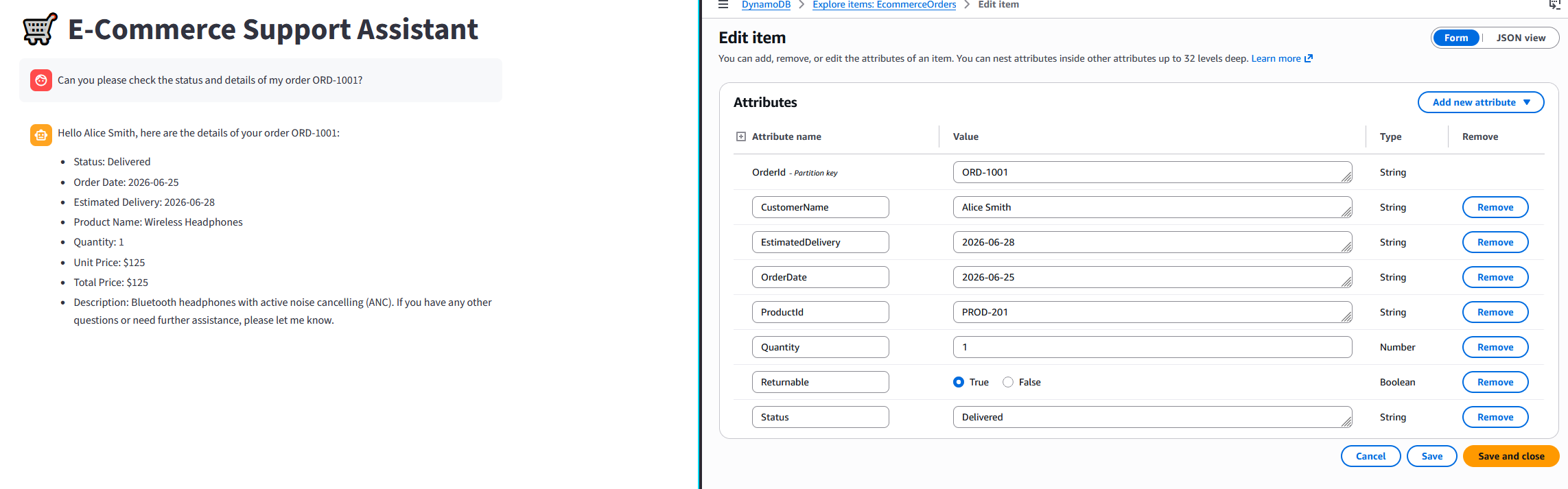
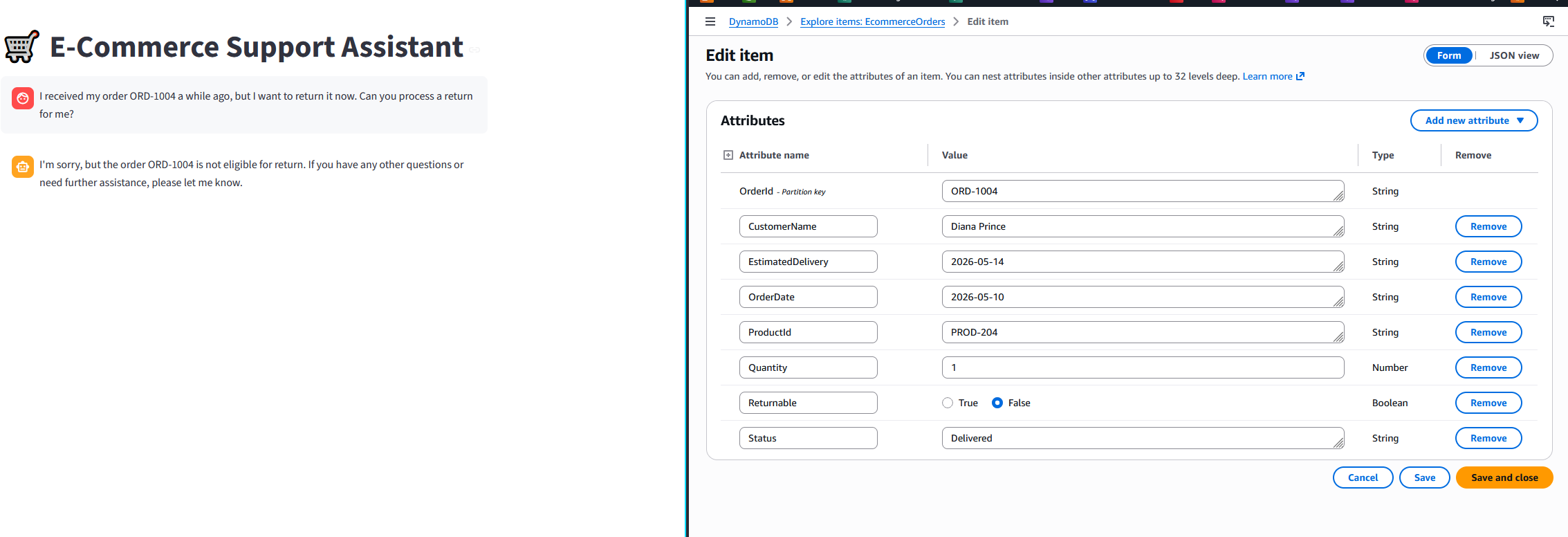
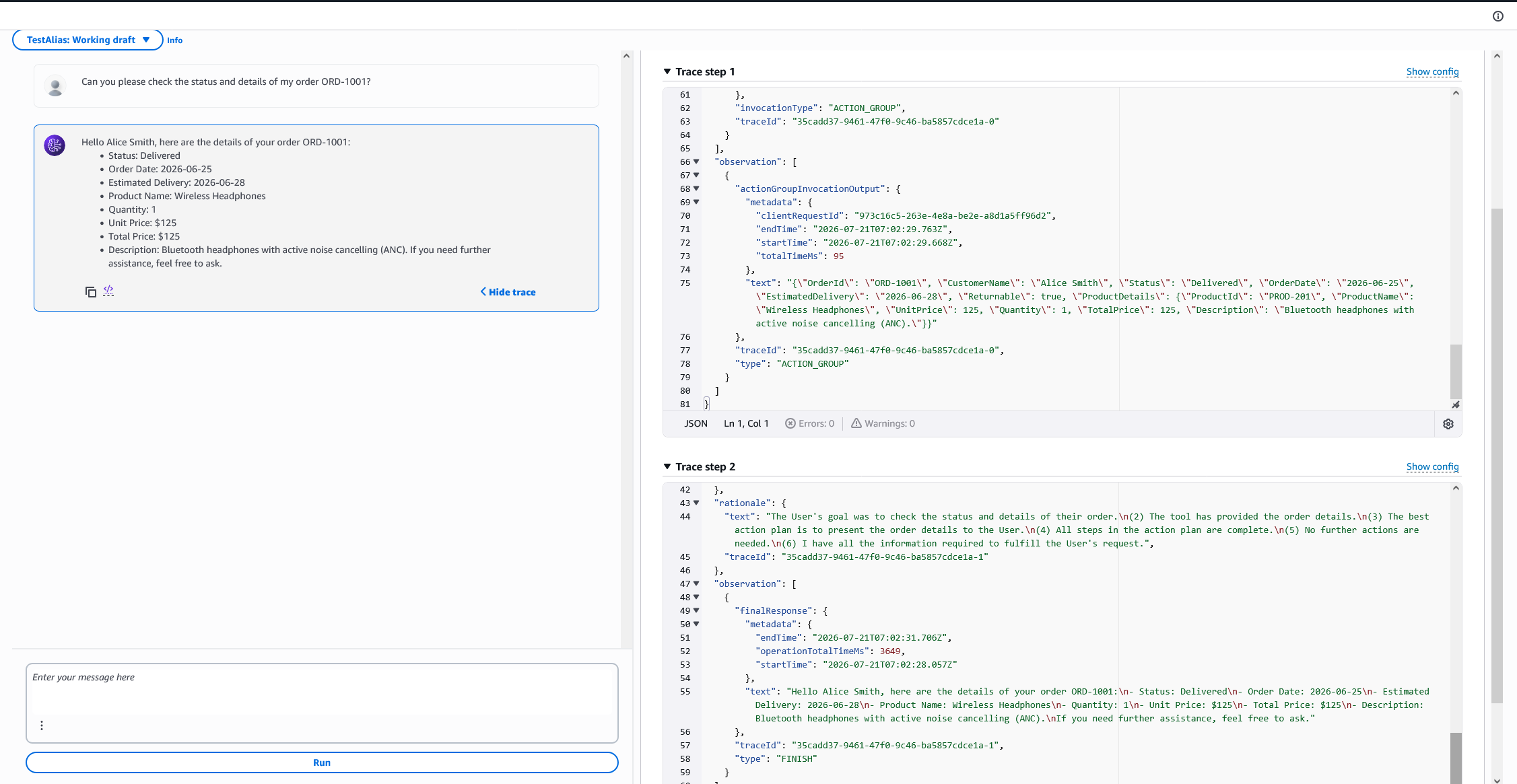
Aşağıda örnek 2 soru için hem Streamlit arayüzünden (DynamoDB kaydı ile) hem de Bedrock Agent test sayfasındaki orkestrasyon adımlarını (trace steps) görebilirsiniz.